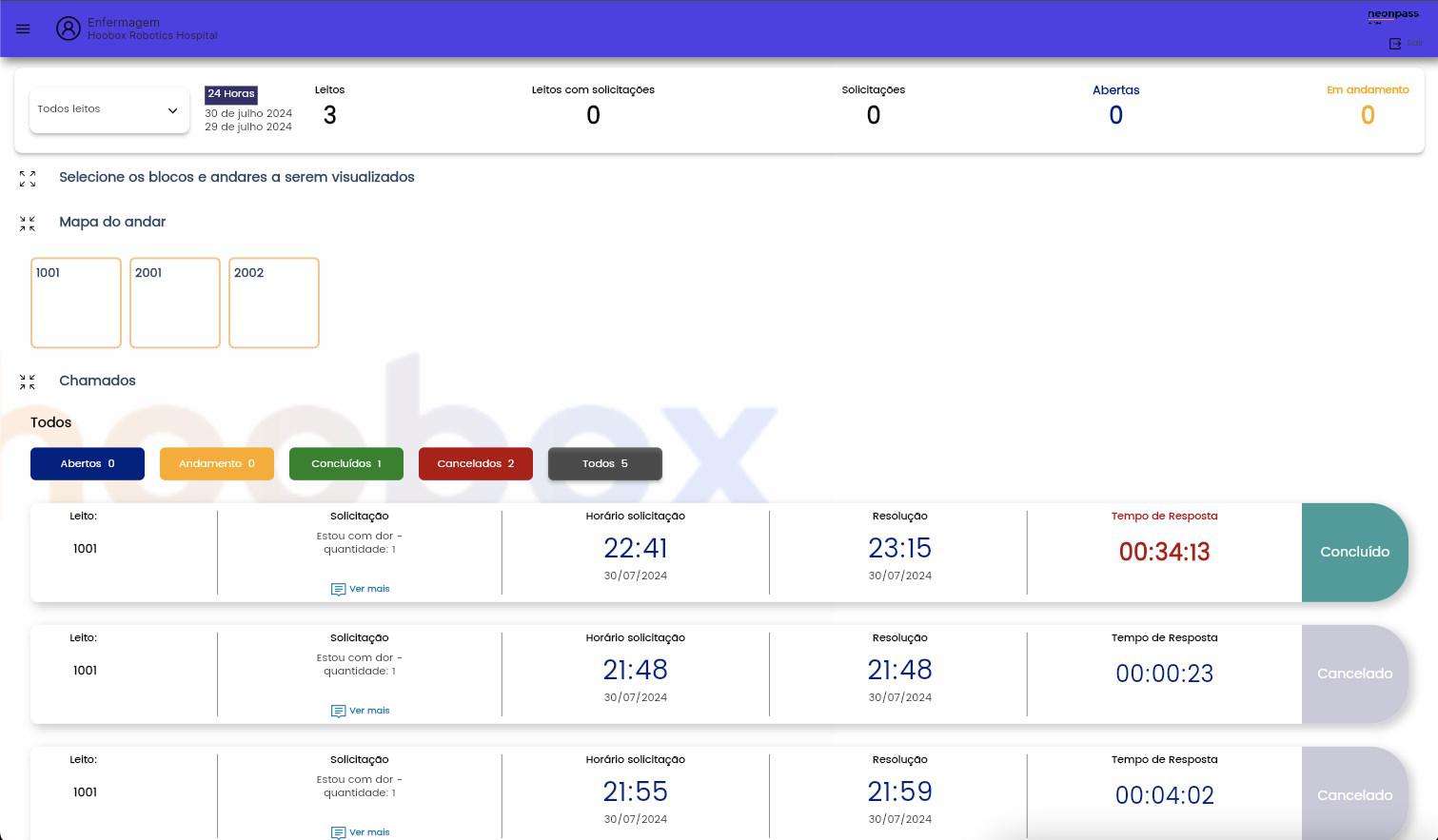

Download NP Room Dash – Surgical Simulation, Hospital Management, Operating Room Efficiency, Medical Training, Healthcare Operations
Overview
NP Room Dash is a simulation-based mobile application designed to immerse users in the complex world of hospital operations, specifically focusing on surgical department management. The app presents players with real-world challenges faced by healthcare administrators, requiring them to coordinate departments, manage surgical scopes, and meet service level agreements (SLAs) under pressure. By simulating high-stakes surgical scenarios, the app serves as a training tool for understanding the intricacies of healthcare operations, from communication protocols to resource allocation. Its target audience includes medical students, hospital staff, and healthcare professionals seeking to enhance their operational awareness through gamified learning.
The app’s purpose extends beyond entertainment—it aims to strengthen decision-making, communication, and strategic planning skills within a medical environment. Each scenario demands careful attention to timing, team coordination, and procedural accuracy, reflecting the demands of actual operating room management. While the developer did not provide additional technical details, the app’s focus on realistic hospital workflows suggests a commitment to educational authenticity. In the broader app ecosystem, NP Room Dash fills a niche for interactive, scenario-driven tools that support medical training and operational preparedness in a mobile format.
Key Features & Functionality
NP Room Dash delivers a structured simulation experience centered around critical aspects of surgical department management. The app integrates several core functionalities that simulate real hospital operations with precision.
- Assertive Communication Skills: Players must establish and maintain clear communication channels between departments. This feature emphasizes the importance of timely and accurate information exchange, a key factor in preventing delays and errors during surgical procedures.
- Surgical Scope Management: The app includes a standardized system for tracking and deploying surgical scopes. Players adapt equipment lists to match specific surgeries, fostering a deeper understanding of procedural requirements and inventory control.
- Business Intelligence Tools: Integrated BI tools provide real-time data on service requests and SLA compliance. These insights support strategic decisions, helping players optimize resource use and improve response times.
- Operational Efficiency Focus: Performance metrics are central to gameplay. Meeting SLAs is a primary objective, encouraging players to balance speed, accuracy, and resource availability under pressure.
- Diverse Surgical Scenarios: A range of scenarios, increasing in complexity, challenges players to adapt their strategies. Each case reflects different surgical needs, promoting flexibility and comprehensive planning.
These features collectively create a dynamic learning environment where users apply theoretical knowledge to practical situations. For example, a user might need to reroute a scope from one operating room to another due to a scheduling conflict, requiring real-time decision-making and communication. The app’s focus on structured workflows ensures that each action contributes to a larger operational goal.
Interface, UX & Performance
NP Room Dash presents a clean, task-oriented interface designed for clarity and usability. The visual layout prioritizes essential information—service requests, SLA status, equipment availability—on a centralized dashboard. Navigation is intuitive, with logical flow between departments, scenarios, and performance reports. Users can access tools and data with minimal taps, supporting fast-paced decision-making.
The app’s design reflects a professional aesthetic, with minimal distractions and a color-coded system to indicate urgency and status. While the developer did not list formal performance metrics, the app’s 45.2 MB size suggests efficient resource usage, likely contributing to smooth operation across mid-range Android devices. Although the developer did not specify minimum OS requirements, the app is designed for mobile use and appears optimized for responsive interaction.
Stability and responsiveness are critical in a simulation app where timing affects outcomes. Based on available information, the app maintains consistent performance during gameplay, with no reported issues in scenario transitions or data updates. The interface remains stable under changing conditions, ensuring that users can focus on strategy rather than technical disruptions.
Platform Compatibility & Technical Requirements
NP Room Dash is available exclusively on the Android platform. The current version is 1.0.0, with a file size of 45.2 MB. This compact size indicates efficient coding and minimal bloat, making it accessible even on devices with limited storage. The app is currently free to download and install, offering full access to all features without in-app purchases.
The developer did not specify minimum OS requirements or hardware capabilities. As such, compatibility with specific Android versions or device categories cannot be confirmed. However, the app’s lightweight design suggests it may run smoothly on a broad range of Android smartphones and tablets released in the past few years. Users should ensure their device meets standard Android system requirements for app installation.
Pros and Cons
Pros
- Realistic simulation of hospital management and surgical operations
- Focus on communication, resource allocation, and SLA compliance
- Compact file size (45.2 MB) for efficient installation and storage
- Free to download and use with no in-app purchases
- Engaging, scenario-based learning suitable for medical training
Cons
- Platform availability limited to Android only
- Specific OS and device requirements not disclosed
- No information on update frequency or future feature roadmap
- Limited to a single category—simulation—without additional tools
- Developer details not publicly available beyond the app name
FAQ
Is NP Room Dash safe to download and install?
Yes, the app is free and available through official Android channels. It does not require root access or special permissions beyond standard mobile app operations.
Can I play NP Room Dash on iOS devices?
Currently, the app is only available on Android. There is no official iOS version listed.
How often is NP Room Dash updated?
The developer has not disclosed update frequency. The current version is 1.0.0, released on 2024-08-01.
Does NP Room Dash require an internet connection?
While not specified, the app’s simulation nature suggests it may function offline. However, real-time data features may require connectivity.
Is NP Room Dash suitable for medical students?
Yes, the app’s focus on surgical scenarios, communication, and operational efficiency makes it a valuable tool for medical training and professional development.
Final Thoughts
NP Room Dash stands out as a focused, educational simulation app that brings the pressures and complexities of hospital management into a mobile format. Its structured approach to surgical operations, combined with real-time decision-making and performance tracking, offers a unique learning experience. The app is particularly beneficial for medical professionals, students, and healthcare administrators seeking to improve their understanding of operating room efficiency and interdepartmental coordination.
With its compact size, free access, and emphasis on practical skills, NP Room Dash delivers strong value in a niche category. While platform limitations and lack of detailed technical information are notable, the app’s core functionality remains robust and purpose-driven. For those interested in medical training tools or operational simulation, this app represents a promising entry.
Download NP Room Dash now


